Connect once.
Trust every number.
Floemdata connects to your database or business application on its own, carries the data end to end into a single warehouse, and tells you when something looks wrong. No custom project per system.
Works with the systems you already run
The connector is generic: it reads a system's own schema and pulls what the catalogue defines. Adding a system means writing a definition, not writing a new product.
Product names and marks belong to their owners; they appear here only to indicate compatibility.
One engine, three jobs
Any source
A SQL database, an ERP or an application behind an API. The connector discovers the schema itself and verifies every field before reading.
Automatic transfer
Incremental, signed and idempotent. Runs on a schedule, resumes where it stopped, never writes back to the source.
Anomaly detection
Deterministic rules over the moved data: stock that does not match, margin that drops, documents that never arrived.
Four steps, then it runs itself
Connect
Point Floemdata at the database or application. It checks permissions, reads the real schema and reports what it can see.
Extract
Only SELECT. No business logic runs on your production system — no aggregation, no heavy joins, no writes.
Model
Raw data is kept as delivered, then typed, de-duplicated and turned into report tables every dashboard reads from.
Watch
One panel shows every installation: last run, row counts, errors, version and the anomalies found.
What you can build on the moved data
Everything Floemdata produces is available through one authenticated API and one consistent set of tables. A metric is defined once and every tool reads the same definition.
Dashboards and BI tools
Power BI, Tableau, Qlik, Looker, Metabase or Grafana read reconciled tables instead of querying your ERP directly.
Your own applications
Customer portals, mobile apps or internal tools call the same endpoints with a scoped access key.
Spreadsheets that stay current
Excel and Google Sheets pull from the API rather than from a copy someone exported last month.
AI assistants
The same definitions feed an assistant, so the number it quotes is the number on the dashboard.
Reads the same tables
The part nobody else shows you
Moving data is the easy half. The value is in catching what the source system quietly got wrong — before it becomes a decision.
Stock that does not add up
Batch and serial balances are recalculated from movement history and compared with the ERP's own stock figure.
Margin and cost jumps
Running cost per batch is recomputed deterministically; sudden shifts and zero-cost lines are surfaced, not averaged away.
Documents that never arrived
Orders without delivery, deliveries without invoice, receipts past due — the chain is checked end to end.
Reconciliation against the source
Every figure is compared with the source system's own report. If they differ, the difference is shown, not hidden.
AI that cannot invent a number
An assistant is only as good as the data under it. Floemdata is built so a model never writes free-form SQL against your ERP.
The model fills a definition, not a query
A question in natural language becomes a validated report definition — which measure, which breakdown, which filter. Anything outside the catalogue is rejected.
Arithmetic stays deterministic
The calculation runs in code, not in the model. The same question returns the same number every time.
Dashboard and assistant cannot disagree
Both go through one compiler, so there is no second path that could produce a different figure.
Your ERP is never exposed to the model
The assistant reads the warehouse through the same scoped API as any other tool.
Status: the data, reconciliation and definition layer works today. The conversational assistant interface is on the roadmap.
Why not just report from the ERP?
Reporting load hurts production
Heavy queries compete with the people entering orders. Moving the data separates analysis from operations.
History changes behind you
Costs and documents get corrected retroactively. A versioned copy lets you reproduce last month's report exactly as it was.
One system is never the whole picture
Sales sits in the ERP, shipping in another tool, payments in a third. Numbers only reconcile in one place.
New reports stop being projects
When the model is defined rather than coded, a new breakdown is a definition change — not a development cycle.
What monitoring actually buys you
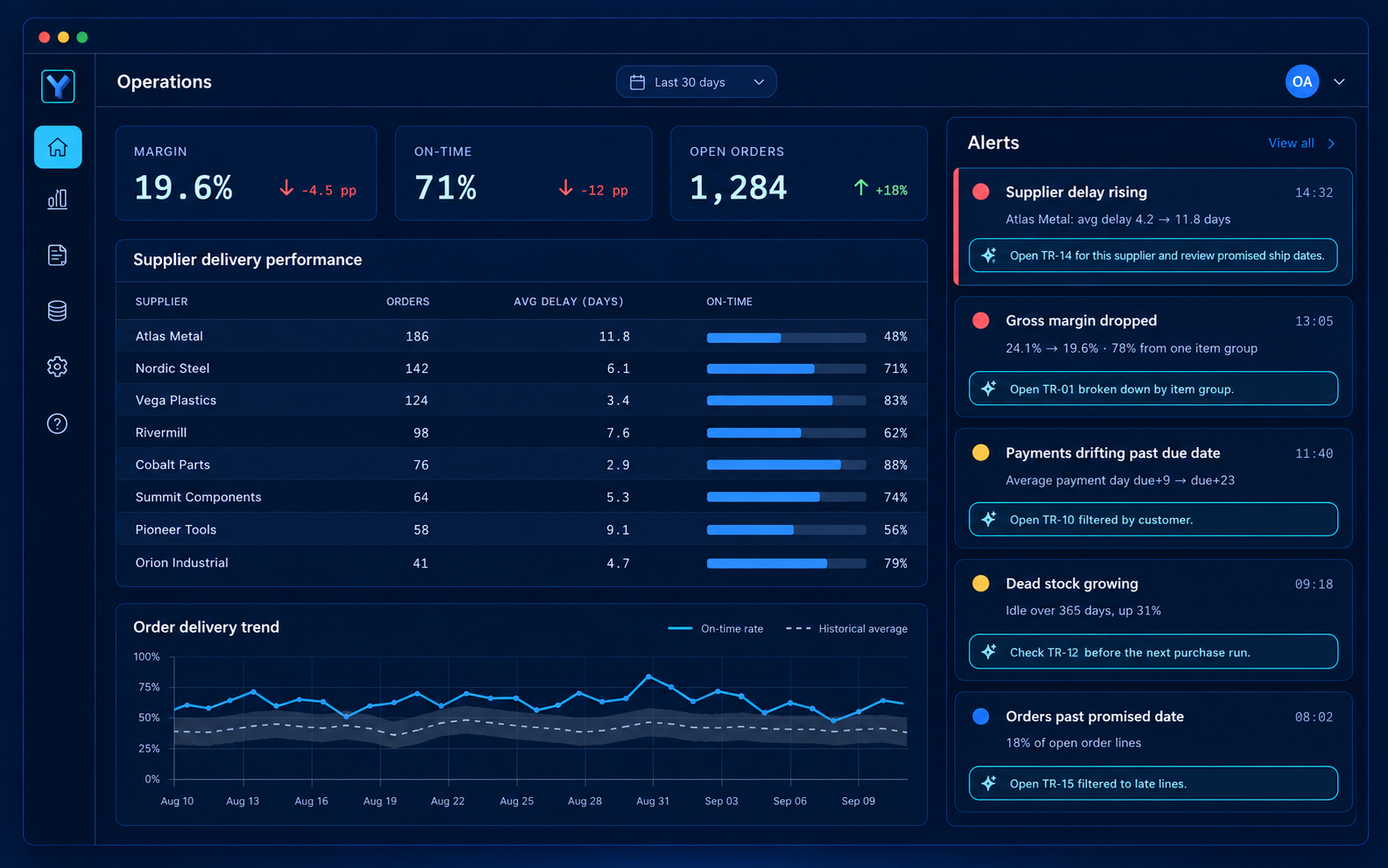
You see a failure before the business does
A pipeline that stopped three days ago is visible immediately, not when someone notices a stale report.
Every installation in one list
Version, last run, error count and configuration summary for each customer site.
Answers without remote sessions
Logs and run history are already collected; no need to dial into a server to find out what happened.
Proof, not promises
Reconciliation status is part of the dashboard, so trust in the numbers is checked continuously rather than assumed.
Reconciliation is the product, not a feature
On a live SAP Business One database, the batch balances Floemdata recalculates from movement history matched the ERP's own stock figure for 117 of 117 items. Where a figure cannot be reconciled, the deviation is displayed — hiding it would make every other number meaningless.
Built to pass the customer's security review
Read-only by design
The agent executes SELECT only. It cannot update, delete or run procedures on the source.
Outbound connection only
Nothing listens on your network. No inbound firewall port is opened for the transfer.
Signed and verifiable
Each batch is signed; the extraction catalogue itself is integrity-checked before it runs.
Credentials stay local
Database passwords live in the machine's own environment, never in a configuration file we ship.
Guides
Plain explanations of the systems and concepts behind the product.
AI-Written Report Summaries: Accuracy Risks
Letting a language model summarise a report saves time but risks invented commentary and wrong figures. Ways to limit the risk and Floemdata's stated principle.
Penny Differences: Line vs Document Rounding
How the cent gap between line rounding and document rounding shows up in totals and how to track it. A small example and the rounding difference field in Floemdata.
Extracting Data Without Slowing Down the ERP
How to extract from a running ERP without slowing it: off-hours first load, reading in batches, pauses, timeouts and a read-only user. Floemdata's documented rules.
FAQ
Is Floemdata only for SAP Business One?
No. The connector is generic — it reads any supported database or application schema and pulls what the extraction catalogue defines. SAP Business One is the first system with a complete, verified catalogue; others follow the same pattern without changing the product.
Do we need custom development for our system?
Not for the product itself. Connecting a new system means describing its tables and keys in a definition file, which is configuration rather than a code branch.
Does our data leave our network?
Only in the direction you allow. The agent opens an outbound connection, sends signed and compressed batches, and never accepts an inbound connection.
How do we know the numbers are right?
Every figure is reconciled against the source system's own reporting. Deviations are displayed in the panel instead of being smoothed over.
Is Floemdata a business intelligence tool?
No — it is the layer underneath. Business intelligence tools such as Power BI, Tableau, Qlik and Excel <strong>display</strong> data; Floemdata extracts it from the ERP, consolidates it in one warehouse and reconciles it against the source. It works with whichever BI tool you already use rather than replacing it.
What is the difference between reporting, data analytics and data science?
<strong>Reporting</strong> tells you what happened. <strong>Data analytics</strong> asks why it happened. <strong>Data science</strong> tries to predict what will happen. All three depend on the same thing: consistent, reconciled data from a single source. Floemdata builds that source; the layer you put on top is your choice.
How does the data transfer work — do we still need Excel?
The transfer is automatic: the connector reads from the source system, transforms and writes to the warehouse — no manual export, no copy-paste, no “final_report_v3_FINAL.xlsx”. You do not have to abandon Excel; it simply reads a live, reconciled source instead of a hand-built file.
Who uses Floemdata?
Everyone who reads a report. A <strong>product manager</strong> or buyer watches delays, stock and cost on their own dashboard; <strong>business analysis</strong> and finance look at margin, collection and ageing breakdowns; a data analyst connects Power BI, Excel or SQL straight to the same warehouse. Because the KPIs are defined in one place, two meetings cannot produce two different numbers.
Want to see it on your own data?
A short call is enough to tell whether your systems are a fit.
Get in touch